> ## Documentation Index
> Fetch the complete documentation index at: https://docs.heysheet.in/llms.txt
> Use this file to discover all available pages before exploring further.
# Email Notifications
> Learn how to receive email alerts for every form submission
Heysheet lets you receive email notifications instantly when someone submits a form — no extra tools required.\
Stay on top of new leads, messages, or support requests in real-time.
***
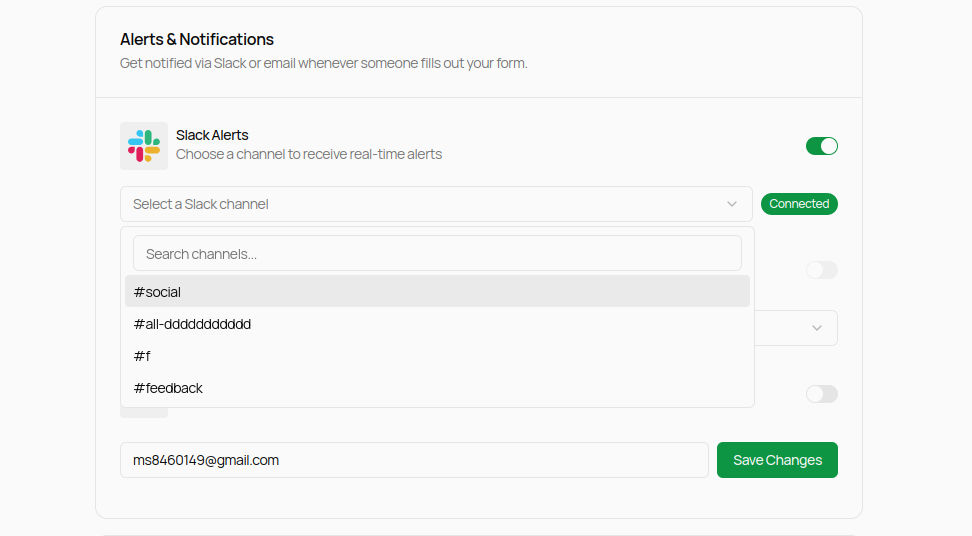
## 🔧 How to Enable Email Notifications
1. Go to the [Heysheet Dashboard](https://heysheet.in/dashboard)
2. Select your form
3. Navigate to the **Alert & Integrations** section
4. Enter the email address where you want to receive alerts
5. Enable **Gmail notification**
6. Click **Save Settings**
***
## ✉️ Email Format
Every notification email includes:
* ✅ The form name
* ⏱ Timestamp of the submission
* 📝 All submitted fields and their values
### Example Notification
***
## 💡 Tips
* Use a valid email address that you actively check.
* Emails are sent from `notify@mail.heysheet.in`. Whitelist this to prevent missing alerts.
* To **disable notifications**, just clear the email field and hit **Save**.
***
## 🛠 Troubleshooting
Not receiving email notifications?
* ✅ Make sure the correct email is entered
* 📥 Check your **Spam**, **Promotions**, or **Updates** tab
* 📤 Make sure your inbox isn't full or filtered
* ❓ Still stuck? Email us at [support@heysheet.in](mailto:support@heysheet.in)
***
## 🔔 Want More?
You can also get real-time alerts in tools like Slack.\
Check out our [Slack Integration Guide](/notification/slack).
***
Let me know if you'd like to add a section for **customizing the email template** or **multiple recipients** in the future.
 ***
## ✉️ Email Format
Every notification email includes:
* ✅ The form name
* ⏱ Timestamp of the submission
* 📝 All submitted fields and their values
### Example Notification
***
## ✉️ Email Format
Every notification email includes:
* ✅ The form name
* ⏱ Timestamp of the submission
* 📝 All submitted fields and their values
### Example Notification
 ***
## 💡 Tips
* Use a valid email address that you actively check.
* Emails are sent from `notify@mail.heysheet.in`. Whitelist this to prevent missing alerts.
* To **disable notifications**, just clear the email field and hit **Save**.
***
## 🛠 Troubleshooting
Not receiving email notifications?
* ✅ Make sure the correct email is entered
* 📥 Check your **Spam**, **Promotions**, or **Updates** tab
* 📤 Make sure your inbox isn't full or filtered
* ❓ Still stuck? Email us at [support@heysheet.in](mailto:support@heysheet.in)
***
## 🔔 Want More?
You can also get real-time alerts in tools like Slack.\
Check out our [Slack Integration Guide](/notification/slack).
***
Let me know if you'd like to add a section for **customizing the email template** or **multiple recipients** in the future.
***
## 💡 Tips
* Use a valid email address that you actively check.
* Emails are sent from `notify@mail.heysheet.in`. Whitelist this to prevent missing alerts.
* To **disable notifications**, just clear the email field and hit **Save**.
***
## 🛠 Troubleshooting
Not receiving email notifications?
* ✅ Make sure the correct email is entered
* 📥 Check your **Spam**, **Promotions**, or **Updates** tab
* 📤 Make sure your inbox isn't full or filtered
* ❓ Still stuck? Email us at [support@heysheet.in](mailto:support@heysheet.in)
***
## 🔔 Want More?
You can also get real-time alerts in tools like Slack.\
Check out our [Slack Integration Guide](/notification/slack).
***
Let me know if you'd like to add a section for **customizing the email template** or **multiple recipients** in the future.