> ## Documentation Index
> Fetch the complete documentation index at: https://docs.heysheet.in/llms.txt
> Use this file to discover all available pages before exploring further.
# Form Submission Webhook: A Developer's Guide
> Learn how to use Heysheet's form submission webhook to send form data to your own server or third-party services. The perfect REST API for form data.
## Send Form Data to Any Service with Webhooks
Heysheet's **form submission webhook** feature allows you to receive real-time notifications of new form submissions. This enables you to **handle form submissions with an API**, giving you the flexibility to integrate with any service you want.
### Why Use Webhooks?
Webhooks are a powerful tool for developers who need to:
* Trigger custom workflows and automations.
* Integrate with a CRM or other third-party service.
* Store form data in a custom database.
* Build a **Jamstack form submission backend**.
***
## How to Set Up a Webhook
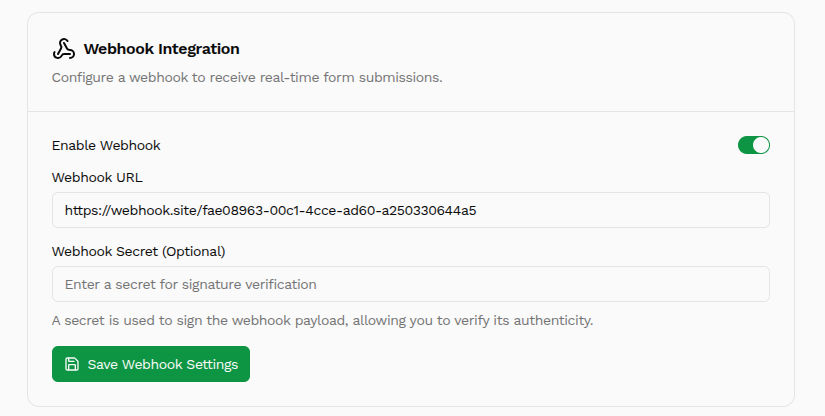
1. From the Heysheet dashboard, select the form you want to configure.
2. Navigate to the "Webhook" section.
3. Enable the webhook and enter your endpoint URL. This is the URL that Heysheet will send a `POST` request to when a new submission is received.
4. (Optional) Add a secret key to secure your webhook.
***
## Webhook Payload
When a form is submitted, Heysheet will send a `POST` request to your webhook URL with a JSON payload containing the form data.
```json theme={null}
{
"formId": "form_abc123",
"submittedAt": "2025-07-19T12:30:00Z",
"data": {
"name": "Alice Johnson",
"email": "alice@example.com",
"message": "Hello from Heysheet!"
}
}
```
This **REST API for form data** makes it easy to parse and use the submission data in your application.
***
## Securing Your Webhooks
To ensure that your webhook requests are coming from Heysheet, you can use a secret key. When you set a secret key, Heysheet will include a `X-Heysheet-Signature` header in each webhook request. You can then verify this signature on your server to ensure the request is authentic.
This makes Heysheet a secure and reliable **form submission API endpoint** for your application.
 ***
## Webhook Payload
When a form is submitted, Heysheet will send a `POST` request to your webhook URL with a JSON payload containing the form data.
```json theme={null}
{
"formId": "form_abc123",
"submittedAt": "2025-07-19T12:30:00Z",
"data": {
"name": "Alice Johnson",
"email": "alice@example.com",
"message": "Hello from Heysheet!"
}
}
```
This **REST API for form data** makes it easy to parse and use the submission data in your application.
***
## Securing Your Webhooks
To ensure that your webhook requests are coming from Heysheet, you can use a secret key. When you set a secret key, Heysheet will include a `X-Heysheet-Signature` header in each webhook request. You can then verify this signature on your server to ensure the request is authentic.
This makes Heysheet a secure and reliable **form submission API endpoint** for your application.
***
## Webhook Payload
When a form is submitted, Heysheet will send a `POST` request to your webhook URL with a JSON payload containing the form data.
```json theme={null}
{
"formId": "form_abc123",
"submittedAt": "2025-07-19T12:30:00Z",
"data": {
"name": "Alice Johnson",
"email": "alice@example.com",
"message": "Hello from Heysheet!"
}
}
```
This **REST API for form data** makes it easy to parse and use the submission data in your application.
***
## Securing Your Webhooks
To ensure that your webhook requests are coming from Heysheet, you can use a secret key. When you set a secret key, Heysheet will include a `X-Heysheet-Signature` header in each webhook request. You can then verify this signature on your server to ensure the request is authentic.
This makes Heysheet a secure and reliable **form submission API endpoint** for your application.